• ERBuilder
  • Feature Matrix
  • Pricing
  • About us
  • ERBuilder Logo
  • 7.0
  • Getting started

    • About ERBuilder

    • Installation guide

    • User interface

  • Project management

    • Creating a new project

      • - Create a new project

      • - New project from scratch

      • - Automatically from user stories/ requirements

      • - From existing database

    • Opening an existing project

    • Closing a project

    • Saving a project

    • Save as a project

    • Exiting the application

    • Project properties

    • Opening multiple projects

  • Diagram Management

    • Add a new diagram

    • Delete a diagram

    • Rename a diagram

    • Diagram properties

    • Add existing tables/relationships to diagram

    • Show/hide relationships from a diagram

    • Export diagram as an image

    • Print/ Preview a diagram

    • Print setup

  • Objects

    • Tables

      • - Creating a new table

      • - Editing a table

      • - Deleting a table

      • - Duplicating a table

      • - Show/hide related relationships

      • - Table Styles

    • Domains

      • - Creating a new domain

      • - Editing an existing domain

      • - Deleting an existing domain

    • Columns

      • - Creating a new column

      • - Editing an existing column

      • - Deleting an existing column

    • Indexes

      • - Creating a new index

      • - Editing an existing index

      • - Deleting an existing index

    • Constraints

      • - Creating a new constraint

      • - Editing an existing constraint

      • - Deleting an existing constraint

    • Keys

      • - Creating a new key

      • - Editing an existing key

      • - Deleting an existing key

    • Triggers

      • - Creating a new trigger

      • - Editing an existing trigger

      • - Deleting an existing trigger

    • Procedures

      • - Creating a new procedure

      • - Editing an existing procedure

      • - Deleting an existing procedure

    • Views

      • - Creating a new view

      • - Editing an existing view

      • - Deleting an existing view

    • Sequences

      • - Creating a new Sequence

      • - Editing an existing Sequence

      • - Deleting an existing Sequence

    • Relationships

      • - Creating a new relationship

      • - Editing an existing relationship

      • - Deleting an existing relationship

      • - Setting relationship line style

      • - Add/ remove relationship point

      • - Show/hide a relationship

      • - Relationship styles

    • Schemas

      • - Creating a new Schema

      • - Editing an existing Schema

      • - Deleting an existing Schema

    • Requirements/ user stories

      • - Creating a new requirement/ user story

      • - Assign a requirement/ user story

      • - Editing an existing requirement/ user story

      • - Deleting an existing requirement/ story

      • - Import/ export requirements and user stories

    • Custom metadata

      • - Create a new custom metadata

      • - Assign a custom metadata

      • - Edit a custom metadata

      • - Delete a custom metadata

    • Manipulate objects

      • - Undo/Redo an action

      • - Copying/Pasting objects

      • - Reaching objects

      • - Organize and arrange Objects on a diagram

      • - Finding/Replacing objects

      • - Replacing data types

  • Connections management

    • Creating a new connection

    • Editing an existing connection

    • Deleting an existing connection

    • SSL settings

    • SSH settings

      • - SSH Connection using Password authentication

      • - SSH Connection using Public key authentication

    • Windows authentication

  • Forward/Reverse engineering

    • Forward engineering

      • - Model validation

      • - DDL Script generation

      • - Database generation

    • Reverse engineering an existing database

  • Advanced features

    • Update database from model

    • Update model from database

    • Generate change script

    • Compare models and/or databases

    • Merge models

    • Change DBMS

    • Model documentation

      • - Generate data model documentation

      • - Confluence connection settings

      • - Auto generate description

    • Generate data dictionary

    • Using ERBuilder console to generate documentation/ data dictionaries

    • Schedule the generation of data dictionaries/ documentation

    • Generate user interface

    • Generate test data

    • Data Generators settings

      • - Assign Data Generators

      • - Add a new generator template

    • Work with virtual test data in a database sandbox

    • Versions control management

  • Generative AI features

    • Auto-generate ERD using generative AI

    • Update model from Requirements/ User Stories using generative AI

    • Generative AI setup

  • Data model browser

    • About data model browser

    • Elements of the data model browser

    • Using the advanced filters

  • Git version control

    • Setup of Git with ERBuilder

    • Import project from Git repository

    • Save changes to Git repository

    • Refresh model

    • Manage versions

  • Options management

    • General

    • Diagram

    • Tables

    • Relationships

  1. Home
  2. Import project from Git repository

Import project from Git repository

To import and open a project from Git repository, go to “Repository | Import” then specify an empty directory on your computer to save your project.
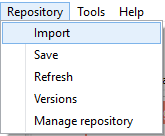

Import project from Git repository


Available in: Enterprise Edition

  • ← Previous
  • Next →

Can't find what you're looking for?

Let us help you right now!

Version 7.0
Copyright © 2023 Softbuilder. All rights reserved.